Using the Predicted Observables for Exoplanets Tool (POET)
The Predicted Observables for Exoplanets Tool (POET) was created to serve as an observational planning tool. The tool is useful for providing estimates of the Habitable Zone (HZ) parameters and predicted planet signatures (e.g. RV and astrometric wobbles, transit depths, etc.) for stars known to host exoplanets or KOIs, Mission Stars, or hypothetical stars. It can be applied to individual stars or to catalogs of stars from the archive.
Printer-friendly version

For an in-depth explanation of how the calculations are made, please read How the Predicted Observables for Exoplanets are Calculated.
This tool uses stellar parameter values from the archive, or as provided by the user, and planet parameters selected or provided by the user. No planet parameters from the archive are currently used in the calculations.
Accessing POET
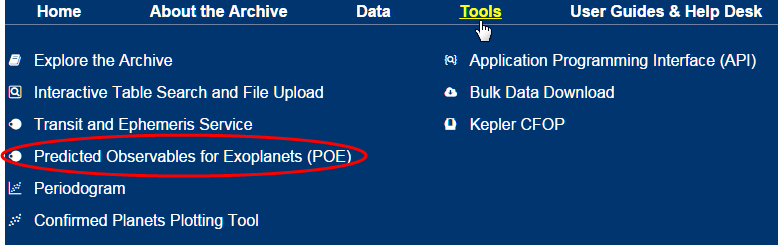
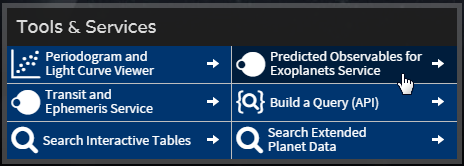
To access the tool, click the Predicted Observables for Exoplanets Service button in the Tools & Services section of the Exoplanet Archive home page. Or, select it from the Tools pull-down menu.
Using POET
The query tab has two panes that require user input:
- Stellar Targets, on the left, is for entering parameters that specify what you are running against.
- Calculated Values, on the right, is to specify which signatures to calculate and to provide hypothetical planet parameters, if needed. (See a description of the calculations.)
Using Pre-loaded Stellar Parameters
You can simply select any of the pre-loaded parameters under Multiple Stars (Confirmed Planet Hosts, KOI Hosts, and Mission Stars) and in Calculated Values (Stellar HZ, Jupiter-like Signature at 5.2 AU, or Earth-like Signature at center of HZ), and then click Run.
Custom Mode
In addition to offering pre-loaded stellar parameters, there is a custom mode in both panes where you can specify your own query parameters.
In the Stellar Targets area, activate the custom mode in one of two ways:
- Click Single Star and enter a star name (e.g. Kepler-79) in the adjacent text box. It is recommended you click the Show/Edit Values button to see whether sufficient default parameters are loaded in the highlighted fields, as several of the defaults may otherwise be null in the results table. (This is only the case for the Single Star option.)
- Select the Custom Stellar Parameters radio button, select either Specify Effective Temperature and Radius or Specify Luminosity, then enter the desired values.
Fields highlighted in red must be populated; white fields with gray borders are not required. Grayed-out fields are not editable. Note the required fields change depending on your selections.
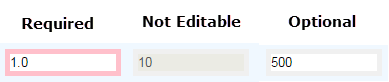
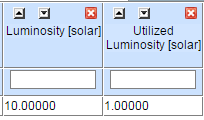
Values entered in gray-bordered (optional) fields are passed along in the query, but not used in calculations. The entered value displays in the results table, as well as the utilized value. In the following example, the user entered 10 for Luminosity, but 1.0 was used in the calculation because Specify Effective Temperature and Radius was selected.
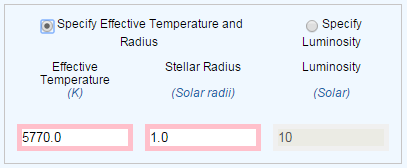
Note that when Specify Effective Temperature and Radius is selected, the stellar luminosity is calculated for use in the algorithms. This derived luminosity, rather than any directly supplied quantity, is then reported in the results table as Utilized Luminosity. The Utilized Luminosity Type indicates the source (user or archive) of the luminosity and whether it was provided directly or derived from the effective temperature and radius.
Working with the Results
After entering the necessary parameters and clicking Run, the tool displays a dialogue box listing the number of results; click OK to view them on the Results tab in an interactive table.
Results can then be filtered, sorted, plotted, and downloaded in different formats, as they can from any interactive table in the Exoplanet Archive. The Interactive Table User Guide contains more information about filtering, sorting, plotting and downloading data.
Note: There is some overlap between the Confirmed Planets table and both the KOI and Mission Star tables. When a query is run on a single star (using Default Stellar Parameters), parameters will always be taken from the Confirmed Planets table. When a multi-star query is run against the KOI or Mission Star table, however, parameters for such duplicates will be drawn instead from the respective KOI or Mission Star table.
You may refine your query by returning to the Query Form tab at any time.
Column Name Descriptions
Most column names in the output table are self-explanatory. Those that merit additional explanation are summarized below.
| Column Name | Description |
|---|---|
| Luminosity | The stellar luminosity, taken directly from the database or user input. |
| Utilized Luminosity | The actual stellar luminosity used in calculating output parameters. This may be the same as the "Luminosity" value, or it may be derived from the stellar effective temperature and radius, depending on the user request and the available input data. |
| Utilized Luminosity Type | Indicates the source of the Utilized Luminosity ("archive" or "user") and whether the value was explicit ("provided"), or whether it was as derived from the effective temperature and radius ("derived"). |
Last updated: 20 October 2015